Attachments 2
Once your attachment assets are in their proper folders, it’s time to create json files for them and make your guns compatible with them.
The item json for attachment items go in the same place as the gun json files: assets/pointblank/items.
We’ll walk through the basic attachment categories, muzzle attachments and grips.
Example grip attachment json:
{
  "name" : "ba_whitefang_grip",
  "type": "Attachment",
  "category": "underbarrel",
  "groups": [
    "underbarrel",
    "underbarrel_extra"
  ],
  "features": [
    {
      "type": "Recoil",
      "recoilModifier": 0.6
    }
  ]
}
As you can see, there’s actually not a lot. There’s:
nameThe item id.typewhich is “Attachment”categorywhich is the attachment category of the attachment. Grips are a default Point Blank attachment category called ‘underbarrel’groupsis where you define what attachment groups the attachment is part of. By putting your custom grip in the “underbarrel” group, this allows any gun that accepts attachment group “underbarrel” to accept your attachment, even if the gun is from the base mod or a different content pack entirely. This is how sometimes you can put on attachments from separate packs onto weapons from completely different packs. Attachment groups also prevents you from having to enter the gun json and manually enter this particular attachment to be compatible. So long as the group is assigned, any gun that accepts this group can accept your attachment.featuresis very similar to thefeaturessection in the gun json. You can define behaviors here, like recoil, scope behavior, and even custom firemodes.
Example suppressor attachment json:
{
  "name" : "ba_whitefang_suppressor",
  "type": "Attachment",
  "category": "muzzle",
  "groups": [
    "ar_suppressors",
    "ar_muzzle"
  ],
  "features": [
    {
      "type": "Recoil",
      "recoilModifier": 1.2
    },
    {
      "type": "MuzzleFlash",
      "effects": [
        {
          "phase": "firing",
          "name": "muzzle_flash_small"
        }
      ]
    }
  ]
}
Here, we see similar code, with some minor differences.
category is set to muzzle, a default Point Blank attachment category which uses _cb_suppressor.
groups defines the attachment to be part of two attachment groups: ar_suppressors and ar_muzzle. Both are groups, like underbarrel, that appear in the base mod.
Under features we see the same recoil feature, in addition to a muzzle flash feature. When this attachment suppressor is attached to a gun, it will increase the recoil and also change the muzzle flash.
Muzzle Attachments Blockbench Tip
For muzzle attachments, sometimes you want to redefine where the muzzle flash is located. A suppressor, for example, makes the barrel longer, so the gun can’t use the default muzzle flash otherwise the muzzle will spawn inside of the suppressor attachment. To prevent this, go to the suppressor attachment model and add a muzzleflash group:
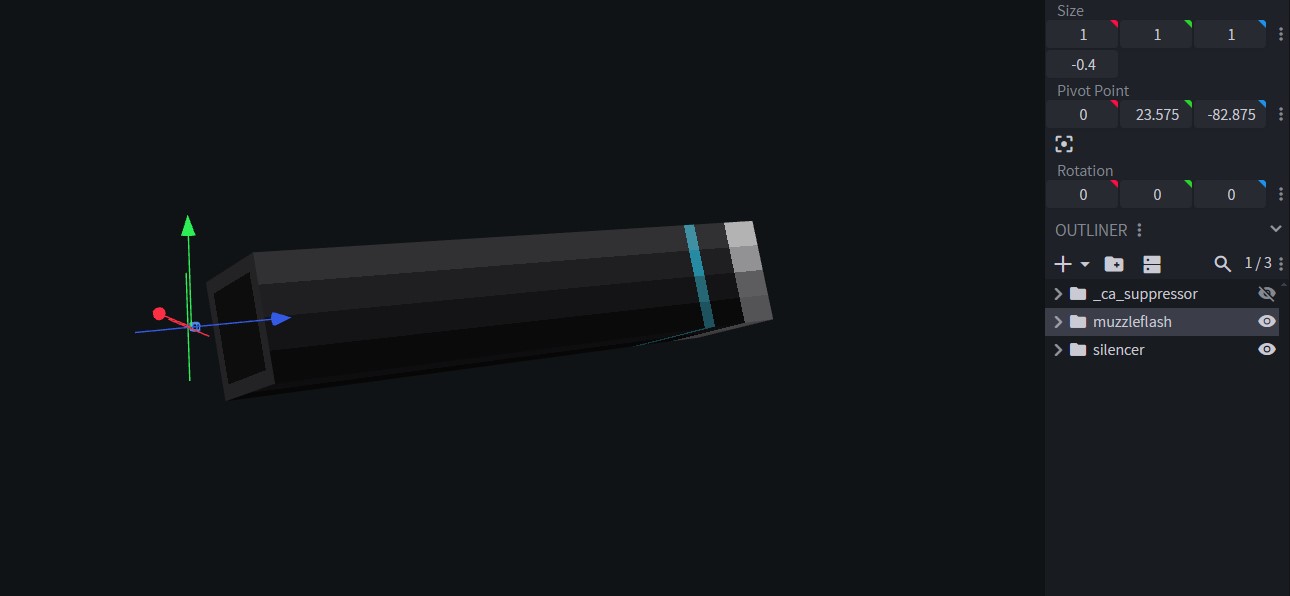
Afterward, you use the muzzle flash feature inside the gun json’s feature section to create logic for the muzzle flash to switch whether it has a suppressor on or not. The full tutorial for this is in Muzzle Flash.
Attachment behaviors
Of course, you can assign any behavior you want to any attachment, regardless of category. The only exception for this is scopes. Features like holographic reticles and PIP/Stencil scopes are exclusive to attachments in the scope category, and cannot work in other categories, even custom ones.
In the previous example, we saw the recoil feature being used for both the grip and the suppressor attachments. You can also apply this feature to scopes.
You can also create entire new firemodes in attachments. This makes it so that if the gun has this attachment installed, it will unlock a new firemode. This is how underbarrel grenade launchers work.
{
  "name": "doom_hc_scope",
  "type": "Attachment",
  "category": "scope",
  "features": [
    {
      "type": "Sound",
      "fireSound": "doom_hc_precision",
      "condition": {
        "selectedFireMode": "precisionbolt_hc"
      }
    },
    {
      "type": "FireMode",
      "fireModes": [
        {
          "name": "precisionbolt_hc",
          "displayName": "label.pointblank.fireMode.precisionbolt_hc",
          "type": "SINGLE",
          "rpm": 80,
          "damage": 30,
          "animationName": "animation.model.firealt",
          "enableFireModeAnimations": [
            {
              "name": "animation.model.switch",
              "duration": 470
            }
          ]
        }
      ]
    },
    {
      "type": "Aiming",
      "zoom": 0.6
    },
    {
      "type": "Reticle",
      "texture": "textures/gui/doom_hc_pip.png",
      "parallax": true,
      "maxAngularOffset": 5
    }
  ]
}
Grenade launcher attachment example:
{
  "name": "doom_launcher",
  "type": "Attachment",
  "category": "doomlauncher",
  "features": [
    {
      "type": "Sound",
      "fireSound": "doom_gl_shoot",
      "condition": {
        "selectedFireMode": "grenade"
      }
    },
    {
      "type": "PartVisibility",
      "parts": [
        {
          "name": "launchermain",
          "visible": true,
          "condition": {
            "isGunInHands": false
          }
        }
      ]
    },
    {
      "type": "Reload",
      "maxAmmoPerReloadIteration": 3,
      "condition": {
        "selectedFireMode": "grenade"
      }
    },
    {
      "type": "FireMode",
      "fireModes": [
        {
          "name": "grenade",
          "displayName": "label.pointblank.fireMode.grenade",
          "ammo": "grenade40mm",
          "maxAmmoCapacity": 3,
          "type": "SINGLE",
          "rpm": 90,
          "animationName": "animation.model.firegrenade",
          "shakeRecoilAmplitude": 2.0,
          "shakeRecoilSpeed": 2.0,
          "shakeRecoilDuration": 350
        }
      ]
    }
  ]
}
For tutorials on how custom firemodes work, visit Fire Modes.
Here, there’s a new Part Visibility condition that isn’t covered in the Features: Part Visibility tutorial section.
The condition is "isGunInHands" which is set to false.
This condition has a very niche use: if the gun is currently rendering, but not in your hands, the attachment visibility will be set to false.
To create underbarrel grenade launchers or animated attachments in general, visit Animated Attachments.
Attachments for Custom Categories
To create custom categories like stocks, handguards, etc., all you need to do is assign the attachment its own category:
{
  "name" : "vmw_m4sopmodii_handguard",
  "type": "Attachment",
  "category": "handguard",
  "groups": [
    "m4_handguard"
  ]
}
{
"name" : "vmw_m4billet_receiver",
"type": "Attachment",
"category": "receiver",
"groups": [
"m4_receiver"
]
}You can spontaneously create a new category, and you can spontaneously create groups.
Keep the name of the category consistent with the name of the attachment connectors in the models: