Rocket Launchers
Creating rocket launchers or grenade launchers, any explosive weapon, will depend on actually the ammo item. Inside the gun json, the only work that’s done to make the weapon explode is to assign it an ammo item that has explosive properties.
Like so:
{
  "name" : "doom_rocketlauncher",
  "type": "Gun",
  "maxAmmoCapacity" : 10,
  "compatibleAmmo" : ["ammocreative", "doom_argentrocket"],
  "damage" : 7.0,
  "rpm" : 88,
  "fireModes" : ["SINGLE"],
  "fireSound" : "doom_rl",
  "drawCooldownDuration" : 820,
  "aimingZoom" : 0.3,
  "gunRecoilInitialAmplitude" : 0.1,
  "shakeRecoilAmplitude" : 2,
  "shakeRecoilSpeed" : 2,
  "viewRecoilAmplitude" : 3,
  "inspectCooldownDuration": 2670,
  "aimingEnabled": false,

  "modelScale": 0.25,
  "jumpMultiplier": 0.25,
  "gunRandomizationAmplitude": 0.0025,

  "glowingParts": [
  ],
  "phasedReloads": [
  ],
  "effects": [
  ]
}
In this example, doom_argentrocket is the ammo the weapon uses. Inside this ammo json is where the actual explosion work happens.
If you’re creating a grenade launcher, you may use the base mod’s grenade ammo, if you don’t want to create your own grenade ammo.
Model Scale
Before we get to creating a json for the explosive ammo, let’s first cover three new settings. You may have spotted them in the previous code example:
modelScalejumpMultipliergunRandomizationAmplitude
Earlier on in these tutorials, it’s stated that you cannot change the scale of the weapons in Blockbench when designing the first person weapon position settings. This is true.
However sometimes, you may still want to because---
When designing weapons that shoot actual projectiles, like rocket launchers, sometimes what might happen is the projectile will spawn too close to the ground. The reason this happens is because of the scale of the gun models. But since we can’t change the model scale in Blockbench, we have to change it in the gun json to combat this problem.
-
modelScaleallows you to change the scale. 0.25 and 0.5 are the options available—meaning these two scales are supported. Other scales, like 0.7, are not supported and will not work. -
jumpMultipliercan be used anywhere, but it’s particularly helpful here. When decreasing the model scale, some procedural animations, like jumping, can be exaggerated. This setting is here to help you tone it down manually if you scale down the weapon. -
gunRandomizationAmplitudecan also be used anywhere, but is also helpful here. Like jumpMultiplier, it helps with procedural animations—Point Blank’s random sway. When the scale is decreased, this animation is exaggerated. This setting can help with that.
In reality, modelScale can be used anywhere else as well. Keep in mind, it will change the way some other settings impact the gun, like gunRecoilInitialAmplitude. It will also change how tracers and possibly other effects emerge from the weapon. modelScale’s intended purpose is for projectile wepaons.
Explosive Ammo
When creating an ammo item, you actually follow a very similar process to creating ammo as shown in Creating Ammo, but with more options.
The basic steps are the same: create a 3D model, export the assets and import them in the correct places. The extra steps for explosive ammo involve more code in the ammo json.
There’s also an extra step for the Blockbench model if you want to have cool effects. Here in this image, there’s a new bone called nozzle. This is where the visual effect magic happens.
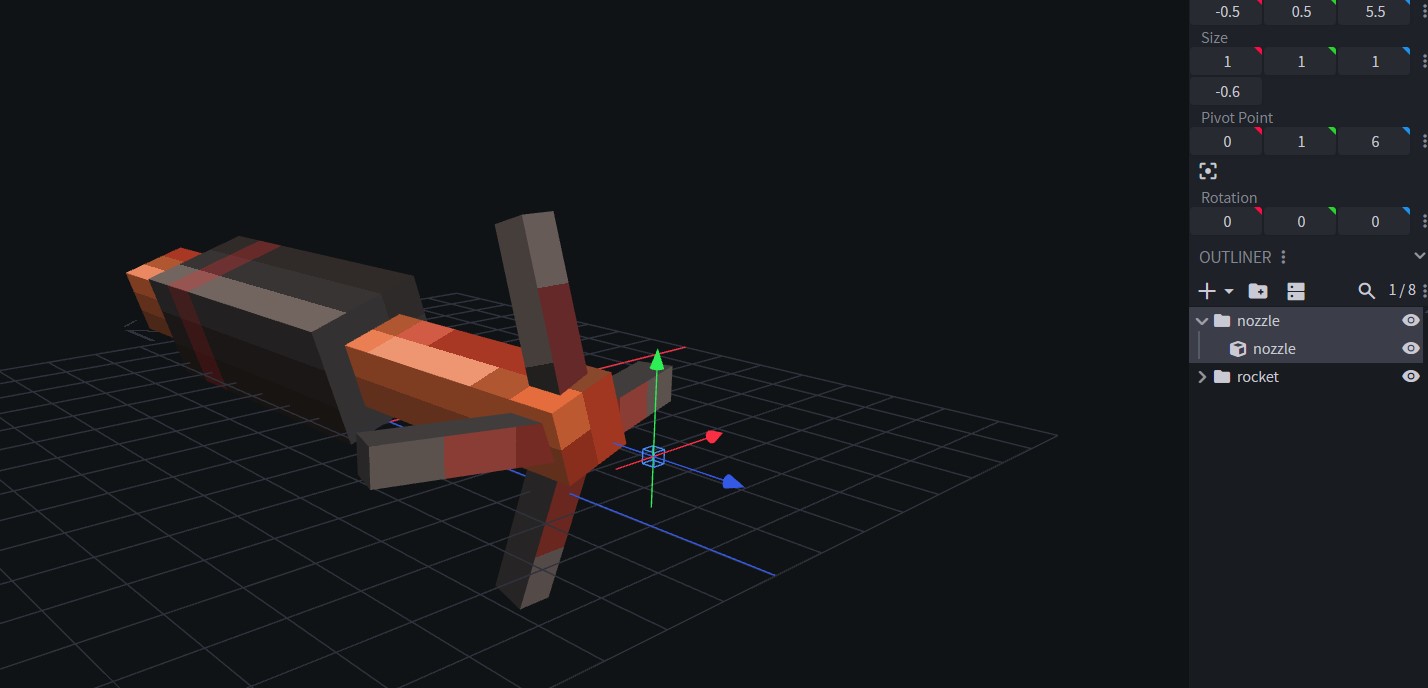
Once you create a item json for the rocket in assets/pointblank/items, open it and input the following code:
{
  "name" : "rocketitemname",
  "type" : "Ammo",
  "projectile" : {
    "initialVelocity" : 65,
    "gravity" : 0.005,
    "topDownAttackEnabled" : false,
    "effects" : [
	      "chem_trail",
          "rocket_exhaust_plume"
      ],
    "renderer" : {
      "type" : "model"
    }
  },
  "explosion" : {
    "power" : 4.0,
    "fire" : false,
    "sound" : null,
    "soundVolume" : 8.0,
    "effects": [
      "explosion", "debris"
    ]
  }
}
This has all the work necessary to make the projectile explode.
The work involves the projectile’s velocity, defined by initialVelocity; its gravity, defined by gravity; effects, inside which the effects chem_trail and rocket_exhaust_plume are named. These effects are provided by the base mod; there’s renderer type model which means the projectile is a 3D model.
And lastly, there’s explosion which handles the various properties of the explosion itself.
powerdefines how powerful the explosion is.firesets whether the explosion spawns fire.soundsets what sound effect the explosion uses. If it’s set to null, it’ll use the mod’s default explosion sound.soundVolumesets how loud the explosion is. It works similarly to gun sounds—volume means block range. 8.0 means 80 blocks.effectsis similar to the other effects section. Here, it’s where the explosion visual effect is defined. Here, it uses the mod’s defaultexplosioneffect anddebriseffect.
If you’re creating a grenade ammo, maybe you’ll want to tinker with velocity, gravity, and remove the rocket_exhaust_plume effect.
You may ignore topDownAttackEnabled—this is for weapons like the Javelin, which has its own system. For rockets or grenades, you may leave this as false.
Non-3D Explosives
Perhaps you want to create an explosive projectile that doesn’t use a 3D model, but instead a cool sprite-sheet-based animated effect.
To accomplish this, you still need a 3D blockbench model for the ammo item itself.
Afterward, the work done in the ammo item json is a bit different from a regular rocket.
{
  "name" : "doom_argentblastcharge",
  "type" : "Ammo",
  "projectile" : {
    "initialVelocity" : 50,
    "gravity" : 0,
    "topDownAttackEnabled" : false,
    "renderer" : {
      "type" : "sprite",
      "texture": "textures/effect/doom_bfg_ball.png",
      "size": 4.0,
      "sprites": {
        "rows": 6,
        "columns": 6,
        "fps": 60,
        "type": "loop"
      },
      "blendMode": "additive",
      "depthTest": true,
      "glow": true,
      "rotations": 0.0
    }
  },
  "explosion" : {
    "power" : 12.0,
    "fire" : false,
    "sound" : "doom_bfgexplosion",
    "soundVolume" : 12.0,
    "effects": [
      "doom_bfg_explosion", "debris"
    ]
  }
}
Here, we see some familiar settings, like explosion and initialVelocity. But we see new things, like sprites. The sprite sheet work here is actually the same that’s used when creating visual effects. In this case, the visual effect isn’t created in its own json file, it’s being created here inside the ammo item.
Instead of renderer model it’s using renderer sprite with its own texture, size (how big the effect will be), sprites and more.
In explosion we see the usage of custom assets as well. For example, a custom explosion sound, and a custom effect called doom_bfg_explosion (this one does need a separate effect json, located in assets/pointblank/effects).
After all of this, you’re done. As usual, you go back to the gun json and invoke the name of the ammo item inside compatibleAmmo.