Charging Weapons
Charging weapons are weapons with which the player needs to hold left-click to charge the weapon, before the weapon finally shoots. Miniguns are usually examples of this, having a wind-up and wind-down mechanic.
To create charging weapons, you can create new animations in Blockbench, and then add extra small code in the gun json.
In Blockbench, you need to create animations preparefire and completefire:
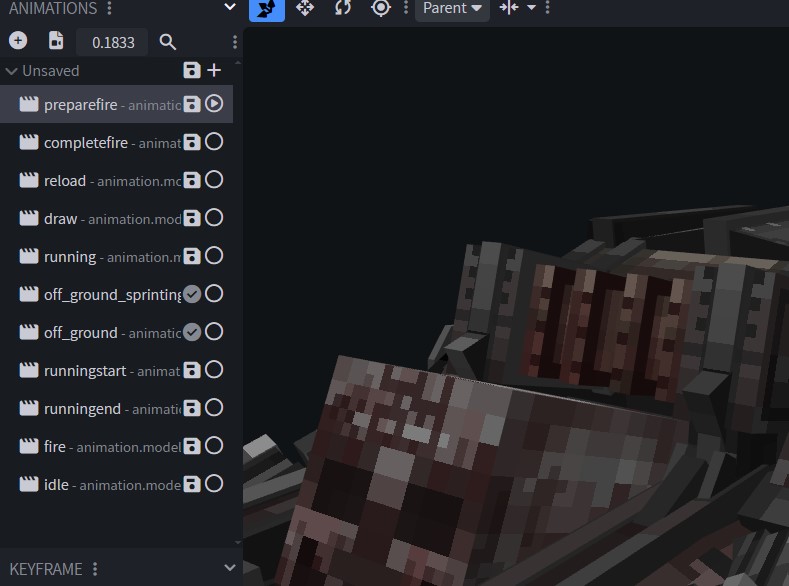
And then in the gun json, you need to write the following code:
"prepareFireCooldownDuration": 180,
"completeFireCooldownDuration": 180
The duration is measured in milliseconds. Make sure it corresponds to the length of your animation.
Here’s an example of a gun json that uses these lines:
{
  "name": "doom_ravager",
  "type": "Gun",
  "maxAmmoCapacity": 70,
  "compatibleAmmo": [
    "ammocreative"
  ],
  "damage": 1.5,
  "pelletCount": 8,
  "pelletSpread": 0.1,
  "rpm": 400,
  "fireModes": [
    "AUTOMATIC"
  ],
  "fireSound": "doom_ravager",
  "prepareFireCooldownDuration": 180,
  "completeFireCooldownDuration": 180,
  "gunRecoilInitialAmplitude": 0.1,
  "shakeRecoilAmplitude": 0.35,
  "shakeRecoilSpeed": 2,
  "viewRecoilAmplitude": 1,
  "features": [
  ],
  "phasedReloads": [
  ],
  "effects": [
  ],
  "idleAnimations": [
  ],
  "inspectAnimations": [
  ],
  "drawAnimations": [
  ],
  "fireAnimations": [
  ]
}
Last updated on