Creating Tracer Effects
To create any visual effect, you need two things: a texture png and a json file that defines the effect.
The texture png should go in assets/pointblank/textures/effect. Since we’re creating a tracer, the png is going to be designed a very specific way. Two textures in the image applied in different ways. Here’s what the png looks like (keep in mind this is one png image, not two):

In the png, there’s a long elongated shape, and a circle shape. These two shapes apply to the tracer effect, which actually functions as a 3D model. The model is composed of 3 planes intersecting, which looks like this:
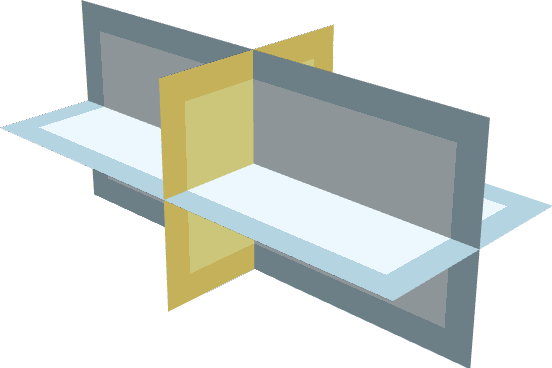
The circle shape applies to the center plane here, called the face. The elongated shape applies to the other two planes, called blades. Together, this creates a convincing tracer effect, which doesn’t look flat.
The json file for the visual effect goes in assets/pointblank/effects. It should be named whatever the name of your effect will be. Same name convention as your guns, so something like ‘packname_effectname’.
Inside the effect json, we’ll write code for the tracer. It looks like this:
{
	"type": "detached_projectile",
	"name": "ba_purpletracer",
	"texture": "textures/effect/ba_purpletracer.png",
	"blendMode": "ADDITIVE",
	"duration" : 200,
	"blade": {
		"count": 2,
		"brightness": 2,
		"width": 0.4,
		"minU": 0,
		"maxU": 0.75
	},
	"face": {
		"brightness": 2,
		"width": 0.4,
		"minU": 0.75,
		"maxU": 1
	},
	"numRotations": 3,
	"glow": true,
	"initialSpeed": 300,
	"acceleration": -10
}
You can safely copy-paste this code and change just the name and texture for your own purposes, then be done.
But if you want more information---
Since this is a tracer, the type isn’t either gun or muzzle_flash, but detached_projectile.
Some of the settings are the same as creating a muzzle flash, such as name, texture, blendMode, and duration. The rest of this is new:
"blade" is where you control the characteristics of the blades of the tracer. "count" is usually set to 2, but you can actually have more if you want. "brightness" defines how bright the tracer is. "width" defines how wide the blades are. A larger value means fatter blades, which means a fatter-looking tracer. Good for powerful weapons like snipers.
"face" is where you control the characteristics of the face of the tracer. You can control brightness and width, just like for the blades.
You’ll notice that both "blade" and "face" also have “minU” and “maxU” which define which part of the png the blades/faces use. For the sake of keeping things simple, as long as you create a tracer texture exactly like the one shown on this page, you won’t ever have to tinker with these settings. There’s also no reason to create your own texture with custom proportions.
"numRotations" defines how many times the tracer rotates in its lifetime. ‘Lifetime’ meaning from the moment the tracer spawns (exiting the barrel of the gun) to the moment it hits a surface/mob (when it despawns). Here, it’s set to 3, so it rotates 3 times in its lifetime.
"glow" is set to true, which means tracers will glow.
"initialSpeed" and "acceleration" are settings that serve as defaults, and there’s no reason to tweak them.
In reality, you can actually copy-paste that whole code block for tracers, change the name of the effect and the texture, and be finished with it. If you want to create fatter tracers for powerful weapons, you can tweak the width of the blades and face.
Once you have the json created, you need to assign its name to the effects section in the gun json, as shown in Effects Overview. It’ll look like this:
"effects": [
    {
      "phase": "hit_scan_acquired",
      "name": "ba_purpletracer"
    }
  ]
After this, you’re done. The gun will have a custom tracer.
If you want to use the mod’s default tracers, you can use:
Regular tracers:
{
    "phase": "hit_scan_acquired",
    "name": "tracer"
}
Minigun tracers (fat tracers):
{
	"phase": "hit_scan_acquired",
	"name": "tracerminigun"
}